Skip to content

World of Warcraft UI simulator

Test your WoW interface – right in your browser.

Load your addons and settings, rebuild your UI, put it through a dungeon or raid and take the result back into the game – no game client required.

Free · no sign-up · your data stays in your browser

Desktop only: the simulator needs a desktop browser with mouse and keyboard (Chrome, Edge, Firefox or Safari). It can’t be started on phones and tablets.

Beta The very first start takes a little longer – about one to two minutes, because game data and the Blizzard interface are loaded. After that it comes from your browser cache and is much faster. UIForever is a beta: not everything works 100 % yet.

New on the blog ·

Forever launches today – here’s where UIForever.com goes from here

After nearly 34.000 Visitors, 1.764 hours spent in the simulator, 12.943 exported profile settings - what is next for UIForever.com...

WoW Forever goes live today, and a lot of you will spend tonight doing what UIForever was built for: rebuilding your UI. So this feels like the right moment to say where the project is heading.

Read more ▾

Forever first. Forever stays the main track for the next months. That means the long tail of addons that still don’t load properly, the Classic-style frames, the Edit Mode details, and everything the nightly compatibility run flags. If you play Forever, the tool will get noticeably better week by week – that’s where the hours go.

Then Retail. Midnight is already in as a second flavour, but it’s a step behind Forever in polish. Once Forever is solid, Retail gets the same treatment: full addon coverage, the same scenarios, the same depth.

Classic comes third. Classic Era, Anniversary and the rest of the Classic family run on the older addon API, which means real engine work rather than just another asset package. It’s on the list, it’s not next, and I’d rather say that plainly than promise a date.

Saved profiles, usable anywhere. The feature I get asked about most: saving your setup to your account so you can open and edit it from any machine – gaming PC at home, laptop, the office browser on a lunch break – and export from wherever you are. This is coming. The server costs behind it are real, which is part of what this Ko‑fi page pays for.

Maybe: a desktop companion app. The last manual step today is copying the exported files into your WoW folder. A small companion app on your gaming PC could sync directly from uiforever.com into the right folder – and pull your latest in-game settings back up. I’m saying “maybe” because it’s a real chunk of work and I want the saved profiles done first. If it happens, you’ll read about it here before anywhere else.

On money, honestly. UIForever is free, and I want to keep it that way – but “free” only works as long as the project is funded, and right now it isn’t. Ko‑fi covers a fraction of the servers, and the hours aren’t on any bill at all. So I’ll be straight with you: if support doesn’t grow, there will be ads at some point, or a paid tier – most likely an ad-free supporter tier with a few extras, while the simulator itself stays open to everyone. I’m not announcing either today; I’m telling you it’s on the table, because you’d rather hear it from me now than find a banner one morning. The best way to keep it from happening is also the simplest: if UIForever saves you an evening tonight, a coffee here goes straight into keeping it free.

Have fun in Azeroth tonight.
Original post on Ko-fi
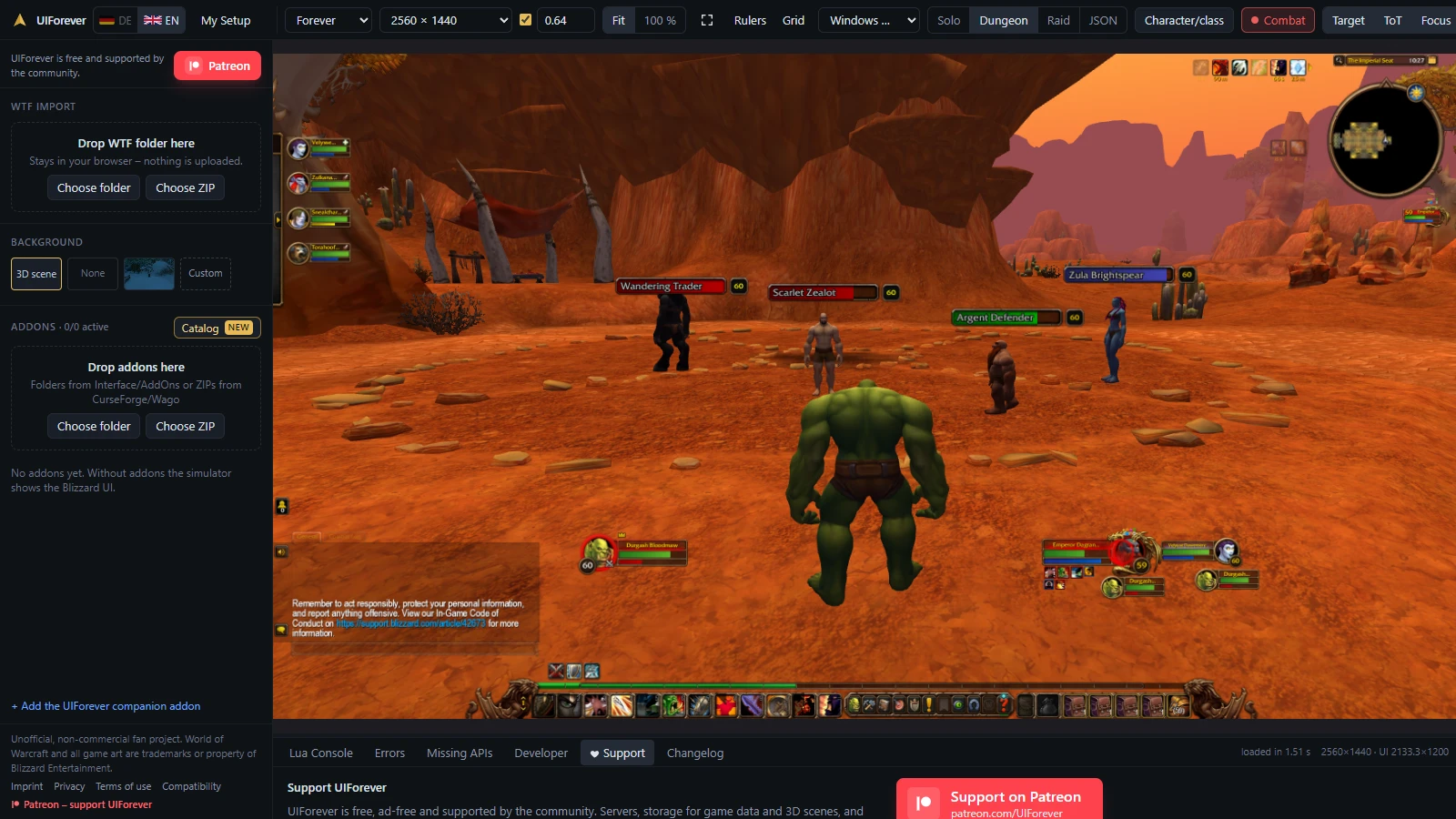
The simulator in the dungeon scenario: addon and WTF import on the left, in the middle the game interface with party frames, action bars and minimap in front of the orc 3D scene in the Valley of Trials – the character stands with their back to the camera, facing four figures with nameplates: a hostile Scarlet Zealot, a neutral trader and two allies.
The default WoW Forever UI in the dungeon scenario – with your race’s 3D scene behind it, including clickable figures and nameplates.

What’s new?

  • Addon compatibility: various bugs fixed – Altoholic, ArkInventory, AutoLayer, Baganator, BigWigs, ConsolePort, CooldownManagerCentered, DataStore, Deadly Boss Mods (Dungeons), EllesmereUI, FojjiCore, ForeverAuras, Guidelime, Leatrix Plus, the MaxDps class modules, SinStats, Titan Panel (Loot Type) and WeaponSwingTimer now work, among others.
  • Simulator in your game language: if your game is set to German, French, Spanish, Portuguese or Russian (WTF folder), the simulator now shows Blizzard’s interface, spells, items and maps in that language – with Cyrillic fonts for Russian and the language’s default key bindings. Addons load their translations, and macros also find items by their translated name (/use Ruhestein). Images with text (e.g. world map, loading screens) stay English. Applies to WoW Forever, not yet to Korean and Chinese.
  • Macros in your game language: if your WTF folder sets the game to e.g. German, French, Spanish, Russian, Korean or Chinese, macros like "/cast Frostblitz" or "#showtooltip Verwandlung" now find their spell – with icon and the right rank. English spell names keep working. Item names (/use) are translated only in WoW Forever for German, French, Spanish, Portuguese and Russian – not in Retail and not for Korean and Chinese.

Pick your game version

Each version comes with its own Blizzard interface. More versions are on the way.

  • WoW Forever

    Available

    The simulator for WoW Forever – with addon catalog and compatibility list.

    Start on a desktop computer
  • Retail (Midnight)

    Temporarily disabled – UIForever currently only works with WoW Forever.

  • Mists of Pandaria Classic

    Mists of Pandaria Classic.

  • Classic Era

    Classic Era – the original WoW.

  • TBC Anniversary

    The Burning Crusade Anniversary.

New

Your race in the background – in 3D

Behind your interface, your character stands in the scene of their race with their back to the camera – just like in the game. Switch race or gender and the scene follows. It loads right at startup, with nothing to set up.

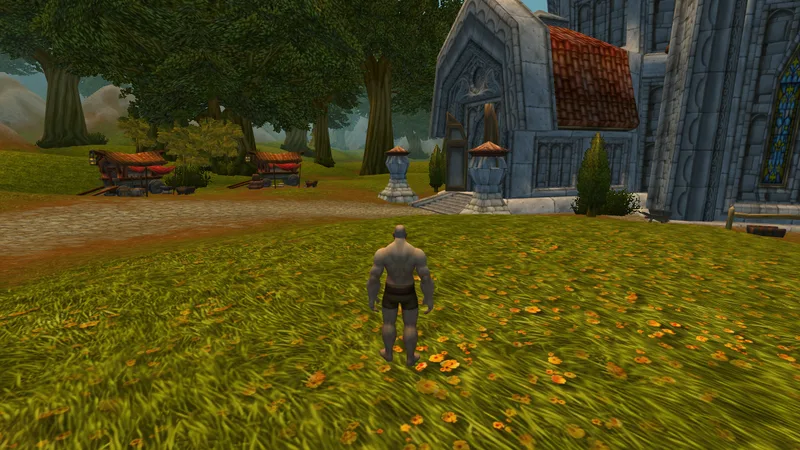
  • A human stands with their back to the camera in a flower meadow in front of Northshire Abbey.
    Human · Northshire
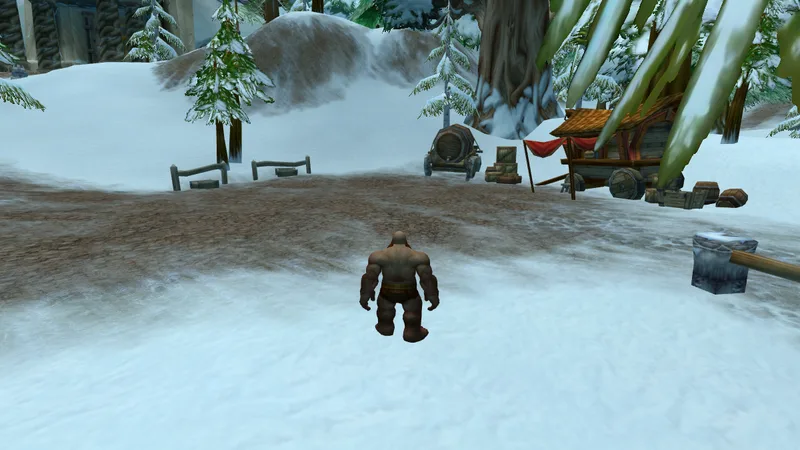
  • A dwarf stands with their back to the camera in snowy Coldridge Valley, with carts and fences ahead.
    Dwarf · Coldridge Valley
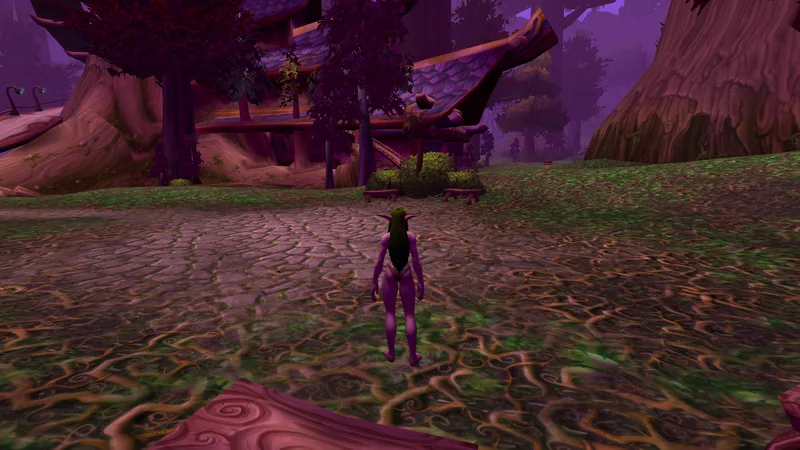
  • A night elf stands with her back to the camera in violet-lit Shadowglen beneath giant trees.
    Night elf · Shadowglen
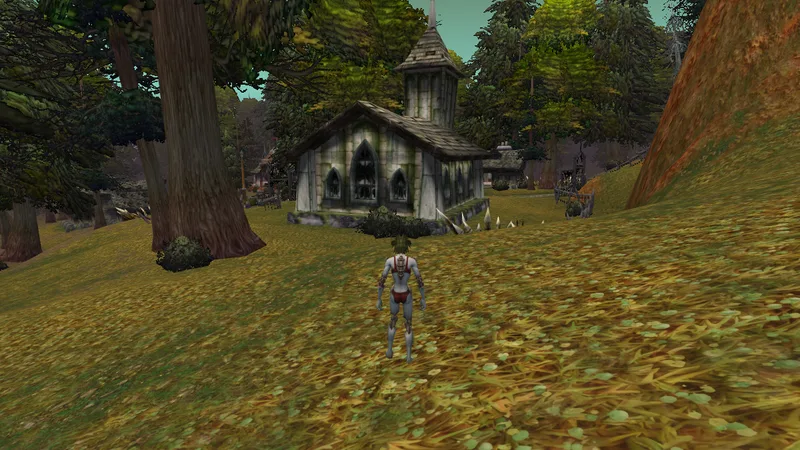
  • An undead stands with her back to the camera on an autumn meadow in front of the Deathknell chapel.
    Undead · Deathknell
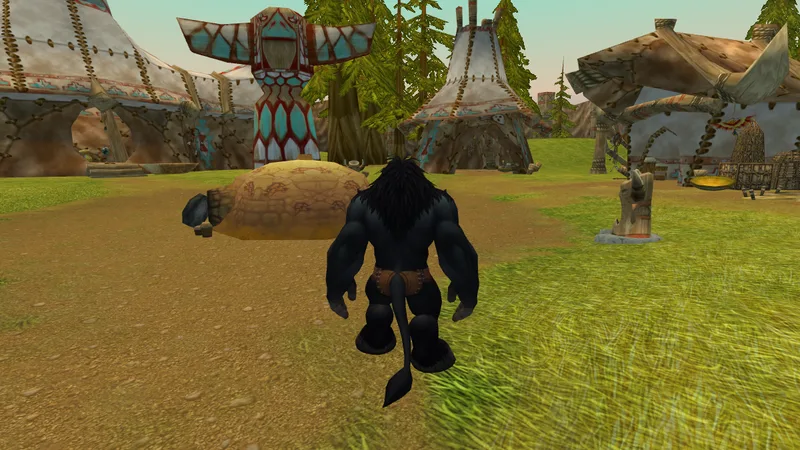
  • A tauren stands with their back to the camera between tents and totems in Camp Narache.
    Tauren · Camp Narache
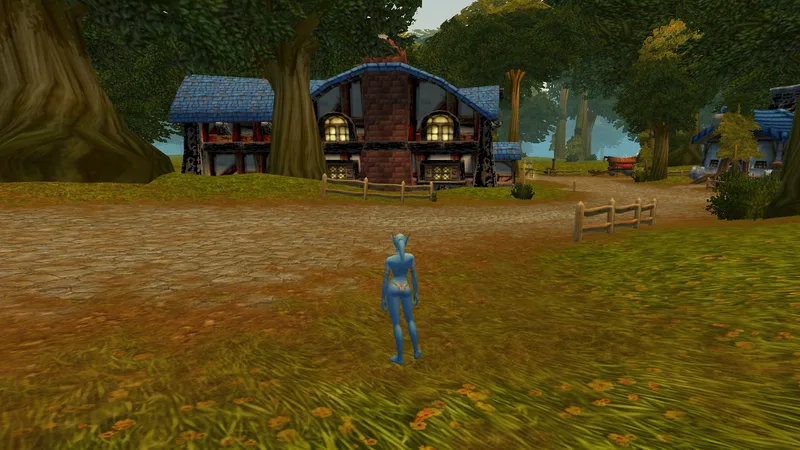
  • A Skyborne stands with her back to the camera on a meadow in front of the Goldshire inn.
    Skyborne · Goldshire

Prefer something calmer? Gallery images, your own picture or a plain background are still available.

Action bars and talents – from the game to the simulator and back

Build your bars and talent setup in peace in the simulator and take them with you into the game.

  • Drag & drop spells

    Drag spells from your spellbook onto your action bars, swap slots or clear them – just like in the game.

  • Talent calculator at level 60

    Spend your talent points at level 60, refund them and apply your choices – in the real talent window, with import and export codes.

  • UIForever companion addon

    The optional addon brings your action bars and talents from the game into the simulator and your changes back again. Add it in the simulator with one click; the export then includes it, or download it on its own.

Important: without the companion addon, your bars stay in the simulator

WoW stores your action bar layout on the server, not in the WTF folder. Spells you drag onto your bars in the simulator will therefore probably not carry over to the game – only with the UIForever companion addon do they make it into the game.

The whole interface – not just a picture

Almost everything you can click in the game works here too: windows open, buttons respond and settings take effect immediately – right down to the options for your action bars.

  • Character, reputation and currencies
  • Spellbook, talents and professions
  • Bags and bank
  • World map and quest log
  • Collections: mounts, pets, toys, appearances
  • Friends, guild and chat
  • Game menu and all options
  • Show and hide action bars
  • Key bindings and macros
  • Edit Mode with grid
  • Drag & drop spells onto action bars
  • Talent calculator
  • Vendors, auction house and mailbox
  • Trainers, flight masters and transmogrification

Your addons, tested in advance

Every night, the ~200 most popular addons for WoW Forever are loaded in the simulator and played through solo, dungeon and raid. So you know which addons work before you install them – and you can load them into the simulator straight from the catalog with one click.

The Blizzard interface itself is almost completely recreated: opening and clicking through around 50 windows no longer hits a single missing game function. A daily check scans the Blizzard windows and the catalog addons for anything that is still missing.

Your own or less popular addons? Just drop them into the window as a folder or ZIP.

For addon developers

Develop faster than in the game

For your own addon, the simulator is a test bench the game doesn’t offer: drop your addon folder into the window and check it in every class, group and resolution – no login, no loading screens.

  • Every class, every situation – instantly

    Switch faction, race and class or jump into a dungeon or raid group with one click. No alts, no group finder, no waiting for a pull.

  • Find bugs instead of hunting for them

    Lua errors with a full stack trace, a list of every game API your addon calls that is (still) missing, and a Lua console for quick checks.

  • Keep an eye on memory and load time

    The developer tab shows memory usage, load time and created frames per addon – with an estimate of how much of it you will see in the game.

  • Check every resolution

    Check your layout at 1080p, 1440p or 4K and at any UI scale without touching your game settings.

  • Set up bags and game state freely

    Put any items in your bags with /uif bag add, set your gold or load your own scenario as JSON – equipment, auras, group and target included. The matching game events fire just like in the game.

  • Fast iterations

    /reload in seconds, SavedVariables and WTF folders via drag and drop, reset with one click.

The simulator recreates the game – before a release, a final test in the real client is still worth it.

Macro builder

Macros with conditionals, without the syntax puzzle

Click together macros with several spells – Shift for your focus, mouseover healing, in combat or not. The builder counts the bytes, finds errors and unreachable clauses and explains the macro in plain language.

Open the macro builder

How it works

  1. Load addons and WTF

    Drop your AddOns folder or ZIP files into the window – and optionally your WTF folder with SavedVariables, key bindings, Edit Mode layouts and CVars. Or load popular addons from the catalog with one click.

  2. Test in scenarios

    Check your interface solo, in a dungeon or in a raid – with party and raid frames, combat state, target and focus. Move frames in Blizzard’s Edit Mode and reload with /reload.

  3. Export back to the game

    Download a ZIP with your WTF changes, an addons.json and step-by-step instructions, and bring your setup into the game.

What UIForever can do

  • The real game interface

    Windows, action bars, minimap and menus behave just like in the game – including Edit Mode and /reload.

  • Any resolution, any UI scale

    Set the resolution and UI scale of your gaming PC and see your UI exactly as it looks in the game.

  • Solo, dungeon, raid

    Scenarios with party and raid frames, combat state, target and focus show how your UI holds up when it counts.

  • Your character, your choice

    Pick faction, race and class – talent trees and spellbook follow along.

  • Your character, detected automatically

    When you load your WTF folder, UIForever picks up your character’s faction, race and class from the saved data of popular addons – such as the UIForever companion addon.

  • Every race, Skyborne included

    Besides the classic races you can pick the Windshaper Skyborne (Horde) and the High Order Skyborne (Alliance).

  • Edit Mode with grid

    Move frames in Blizzard’s Edit Mode and line them up on the grid – just like in the game.

See which addons currently work on the compatibility page.

Your data stays with you

Addons, SavedVariables, key bindings and settings stay in your browser’s storage – none of it is uploaded.

Read the privacy policy

Support UIForever

UIForever is free and ad-free. Servers, storage and the nightly addon checks still cost money – a one-off donation on Ko-fi helps us reach our funding goal, develop the simulator further and add new game versions.

All features stay free for everyone.

Buy me a coffeeko-fi.com/uiforever

Frequently asked questions

Do I need WoW installed?

No. UIForever serves the game assets it needs. All you need is an up-to-date browser.

Is my data uploaded?

No. Addons and your WTF folder stay in your browser’s storage.

Which game versions are supported?

WoW Forever. Retail (Midnight) is temporarily disabled; Mists of Pandaria Classic, Classic Era and TBC Anniversary are planned.

How do my action bars get into the game?

WoW stores your action bar layout on the server, not in the WTF folder. Without the UIForever companion addon, spells you drag onto your bars in the simulator will therefore usually not carry over to the game. Install the addon from your export in the game – the next time you log in, it sets up your bars the way they are in the simulator.

Will my addons work?

The most popular addons for WoW Forever and Retail are tested every night and rated “works”, “gaps” or “broken”. The compatibility page shows the current status – per game version.

What does UIForever cost?

Nothing. UIForever is free and supported by the community – if you would like to support the project, you can make a voluntary one-off donation on Ko-fi.

Is UIForever official?

No. UIForever is an unofficial fan project and is not affiliated with or endorsed by Blizzard Entertainment.

Start the simulator on your desktop computer.